Imported from the Apple Support Forums via the Wayback Machine 🔗
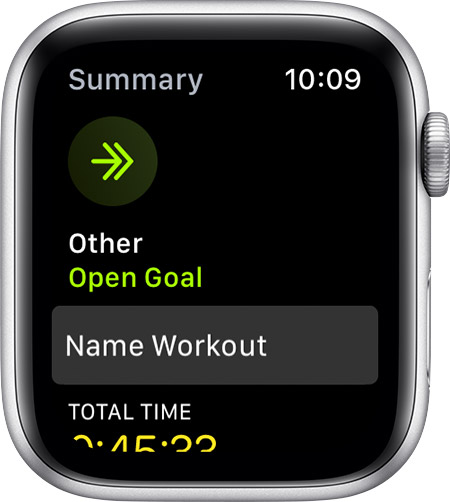
I have followed the steps to name “Other” workout and once I end the “Other” workout it goes right back to the default menu of workouts and it does not go to a screen where I can name the workout as the instructions say. Help?
Imported from the Apple Support Forums via the Wayback Machine 🔗
Name your workout
After you use the Other workout, you can choose a name for your workout. This can help you track workouts like dance or strength training.
On your Apple Watch, open the Workout app.
Tap Other.
Complete your workout.
When you’re done, swipe right, then tap End.
Tap Name Workout.
Tap the type of workout, then tap Save.
0
ShannyD·
Imported from the Apple Support Forums via the Wayback Machine 🔗
I have tried this but after step 4 is where I am having trouble. I do not get the screen in Step 5. After I end the workout in Step 4 it goes right back to the default list of workouts.
0
seanfromllanelli·
Imported from the Apple Support Forums via the Wayback Machine 🔗
I believe the workout will appear in you list of work outs on activey. Have checked there ? Actually when you have chosen the name scroll to the bottom and select done. Then it appears in you work out list.
0
seanfromllanelli·
Imported from the Apple Support Forums via the Wayback Machine 🔗