Benches Uncategorized

4

add hh:mm:ss

apple Verified

Imported from the Apple Support Forums via the Wayback Machine 🔗

Help please.

I want to add inn Numbers HH:MM:SS for different events to total HH:MM or HH:MM:SS. I was able to do this in Excel, but the formula did not import into Numbers and I can't figure out a way add the time.

4 replies

Sign in or join Beachball Help to reply.

  1. 0

    SGIII

    Imported from the Apple Support Forums via the Wayback Machine 🔗

    Numbers has the "Duration" Data Format, which Excel doesn't have. Have a look in the Cell tab of the Inspector at the right at the dropdown under Data Format. They can be formatted in various ways, including the time format you posted, but should be entered using the duration notation, e.g. 10h10m30s. Durations can be added to calculate the total time elapsed (duration) for an event.

    SG

  2. 0

    Yellowbox

    Imported from the Apple Support Forums via the Wayback Machine 🔗

    Hi ialreadydidthis,

    In Numbers, format the times (Column A) with Format Panel > Cell > Data Format > Date & Time > Date: None and Time: as 24 hour clock (hours:minutes:seconds)*.

    Formula in column B (and Fill Down)

    = DURATION(,,TIMEVALUE(A2)×24)

    From the Function Browser,

    The TIMEVALUE function returns the time as a decimal fraction of a 24-hour day for a given date/time valueor time string.

    Multiply by 24 to get a Duration.

    Note the leading commas that tell Numbers to leave out Weeks and Days in the DURATION part of the formula.

    Column B is formatted as:
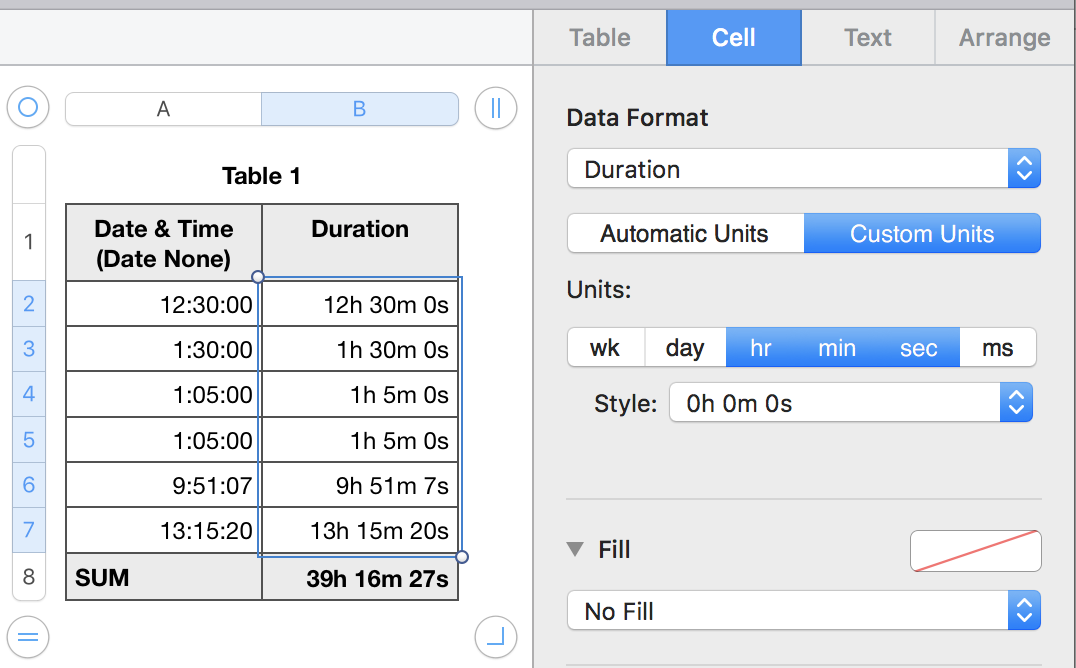
    *Further testing shows that it does not matter how Column A is formatted, so long as the times are valid. This method calculates the Duration since midnight at the start of a day.

    Regards,

    Ian.

  3. 0

    ialreadydidthis

    Imported from the Apple Support Forums via the Wayback Machine 🔗

    Thanks, SG. I'm not sure what I did, but I combined your answer with Ian's (see reply below) and what I wanted to do works.

    Thanks for the help!!!

  4. 0

    ialreadydidthis

    Imported from the Apple Support Forums via the Wayback Machine 🔗

    Thanks, Ian. I'm not sure what I did, but I combined your answer with SG's (see reply above) and what I wanted to do works.

    Thanks for the help!!!