
"Update Apple ID Settings - Some account…
apple Verified ·
Imported from the Apple Support Forums via the Wayback Machine 🔗
Why do I keep getting "Update Apple ID Settings - Some account services will not be available until you sign in again" on my iPad?
It only happens on my iPad not my iPhones or MacBook Pro
10 replies
Sign in or join Beachball Help to reply.
- 0
gail from maine ·
Imported from the Apple Support Forums via the Wayback Machine 🔗
See this support article for help:
What To Do When It Says “Update Apple ID Settings” On Your iPhone
Open the Settings app and tap on Update Apple ID Settings. Then, tap Continue on the next screen. Enter your Apple ID password when the pop-up appears on the screen.
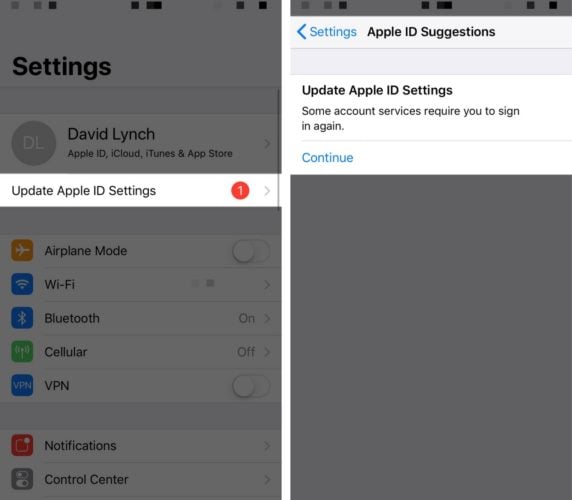
Most of the time, the “Update Apple ID Settings” notification will go away
after you’ve entered your Apple ID password. However, in rare cases, the
notification won’t disappear, and you may even receive an pop-up saying
an error occurred. Keep reading to learn how to fix this problem!
From this article found in a Google search: https://www.payetteforward.com/update-apple-id-settings-on-iphone-what-it-means-what-to-do/
Follow all of the prompts until you have finished the process.
Best,
GB
- 0
astuart ·
Imported from the Apple Support Forums via the Wayback Machine 🔗
Thanks, what do I do to the iCloud Keychain to fix the problem? I have signed in and out but still having the same issue.
- 0
Eric Root ·
Imported from the Apple Support Forums via the Wayback Machine 🔗
Some people have resolved this by signing out of iCloud and back in.
- 0
astuart ·
Imported from the Apple Support Forums via the Wayback Machine 🔗
can you be more specific where in the settings I go?
- 0
Eric Root ·
Imported from the Apple Support Forums via the Wayback Machine 🔗
Some people have resolved this by signing out of iCloud and back in.
- 0
miskeecare ·
Imported from the Apple Support Forums via the Wayback Machine 🔗
It is the icloud keychain
- 0
astuart ·
Imported from the Apple Support Forums via the Wayback Machine 🔗
Thanks, what do I do to the iCloud Keychain to fix the problem? I have signed in and out but still having the same issue.
- 0
gail from maine ·
Imported from the Apple Support Forums via the Wayback Machine 🔗
So, you have gone into the Settings, tapped on the flagged option, and followed the prompts to the end?
Best,
GB
- 0
astuart ·
Imported from the Apple Support Forums via the Wayback Machine 🔗
can you be more specific where in the settings I go?
- 0
gail from maine ·
Imported from the Apple Support Forums via the Wayback Machine 🔗
See this support article for help:
What To Do When It Says “Update Apple ID Settings” On Your iPhone
Open the Settings app and tap on Update Apple ID Settings. Then, tap Continue on the next screen. Enter your Apple ID password when the pop-up appears on the screen.
Most of the time, the “Update Apple ID Settings” notification will go away
after you’ve entered your Apple ID password. However, in rare cases, the
notification won’t disappear, and you may even receive an pop-up saying
an error occurred. Keep reading to learn how to fix this problem!
From this article found in a Google search: https://www.payetteforward.com/update-apple-id-settings-on-iphone-what-it-means-what-to-do/
Follow all of the prompts until you have finished the process.
Best,
GB