Benches / Mail, Safari and messaging
4
Safari Browser popup Blocker is not worki…
apple Verified ·
Imported from the Apple Support Forums via the Wayback Machine 🔗
Hi Apple Team,
I enabled popup blocker in my Macbook Pro safari browser using these steps Safari>Preferences>Security>Checked Block pop-up Windows
However, this seems to be not working. I want to enable pop-up blocker for specific website addresses. Is there any other way to do the above thing?
Please help to resolve this issue at the earliest.
Thanks & Regards
Tanuja Singh
4 replies
Sign in or join Beachball Help to reply.
0
dominic23 ·
Imported from the Apple Support Forums via the Wayback Machine 🔗
Safari 12
Block pop-ups option is moved to Websites pane.
1. Visit the site.
2. Safari > Preferences > (1) Websites > (2) Pop-up windows
3. Click inside the box next to the website and choose “Block”.
4. When visiting other websites choose an option other than “Block”.
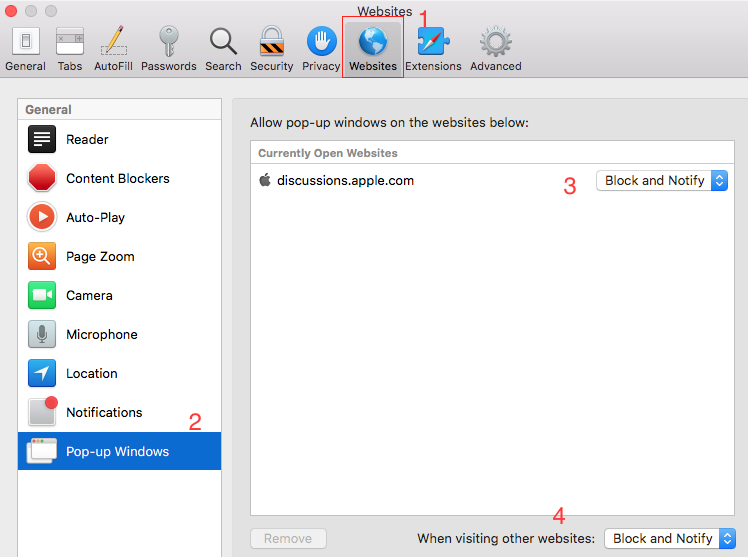
For details: https://support.apple.com/guide/safari/websites-ibrwe2159f50/mac
https://support.apple.com/guide/safari/customize-settings-per-website-ibrw7f78f7fe/mac
0
Eric Root ·
Imported from the Apple Support Forums via the Wayback Machine 🔗
If you aren't using Safari version 12.0.3, try going to the App Store Updates tab and update Safari.
0
tanuja5nov ·
Imported from the Apple Support Forums via the Wayback Machine 🔗
My current safari version 10.11.6 and appstore do not show any safari update.
Please check screen-shot and suggest me how can i update safari latest version.
[Image Edited by Host to Remove Personal Information]
0
Eric Root ·
Imported from the Apple Support Forums via the Wayback Machine 🔗
You need to upgrade your OS to get the newest version of Safari.
Check each link for the computer requirements to upgrade to the OS to see if your computer can be upgraded.
How to upgrade to macOS Mojave - Apple Support
How to get macOS High Sierra
Sierra download
Check to make sure your applications are compatible.
Application Compatibility
macOS Sierra 10.12: Compatible Apps
Also check to make sure there is a compatible driver for your printer.
Do a backup before installing, preferable 2 backups on 2 different drives.
