Benches macOS

10

Disable Local Snapshots of Time-Machine

apple Verified

Imported from the Apple Support Forums via the Wayback Machine 🔗

Hi

I got me a 4TB internal SSD for my mac, so I do not have space issues.

Now all the time, they get filled up with local snapshots, and I can not get rid of it.

I had a 2TB SSD before, and had the same issue. Now 4 TB, and it files sometimes over 2Tb with local Snapshots. When I then want to copy 1.5T to the internal SSD, and I only use 1TB, I can not copy it over. NOT ENOUGH DISK SPACE.

It does not clean up the local Snapshots as advertised, and I run into this weekly.

Then I have to copy small parts in several sessions... this really sucks.

Anyone have an idea how to solve this?

OS X everything updated to newest version.

Dispale wioth #sudo tmutil disablelocal does not work anymore since Mojave

THX

10 replies

Sign in or join Beachball Help to reply.

  1. 0

    ⁤aaplCore

    Imported from the Apple Support Forums via the Wayback Machine 🔗

    If you want to delete local snapshots manually, just turn off Time Machine and give it a few minutes to automatically delete them. When you turn Time Machine back on, it remembers your previous backup disks.

    About Time Machine local snapshots

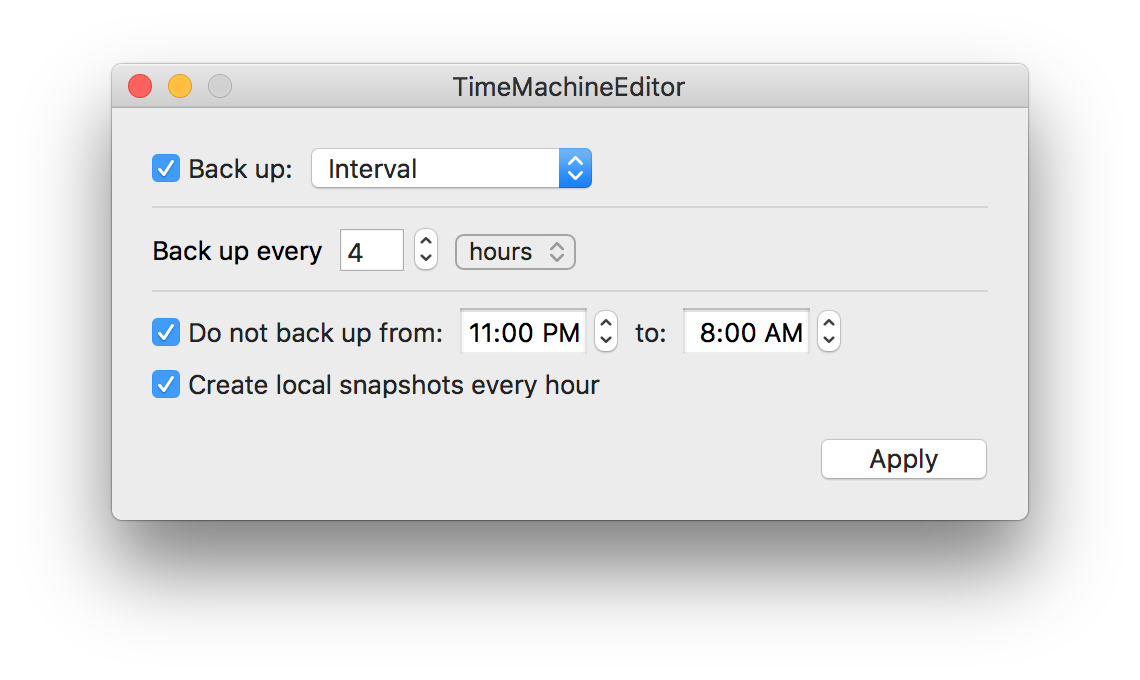
    Use TimeMachineEditor to change default one-hour backup interval of Time Machine or create a more sophisticated scheduling.

  2. 0

    Paz.americano

    Imported from the Apple Support Forums via the Wayback Machine 🔗

    I will give it a try. I started it, and Time Machine was off when I did so.

    I did not check Create local backup

    It then starts to create a new Time Machine backup, even with the button "Backup Automatically" turned off in settings for time machine.

    • there is now one new local snapshot if I look with terminal

  3. 0

    Paz.americano

    Imported from the Apple Support Forums via the Wayback Machine 🔗

    thank you, and I used those commands before to clear up space. But it is quite cumbersome and it does not delete all local snapshots, even if it tells you so.

    As of now, I deleted 7, three are still there, 4 are actually deleted.

    The space re3served for local snapshots is 1.2 TB, deleting the 4 freed out 100GB.

    • Still 1.16 TB used for local snapshots.
    • Time machine turned off

    Apple is unfortunate not able to help me at all. I run in this continuously... and I can not spend hours each week to free up space, just because I want to copy data to my working drive. =(

  4. 0

    leroydouglas

    Imported from the Apple Support Forums via the Wayback Machine 🔗

    Any way to disable local snapshots?

    the disablelocal command has been deprecated and no longer listed in the man page.

    man tmutil | more
    

    You can look for a dataless snapshot which may be causing the issue(?)

    ** if you have any dataless snapshots in the list: It will literally say (dataless.)—IF so delete them—

    Applications/Utilities/Terminal.app

    From the Terminal   look at  Time machine local snapshots, copy & paste:

    tmutil listlocalsnapshots /
    

    # tmutil listlocalsnapshots /

    com.apple.TimeMachine.2017-10-04-014927 (dataless)

    com.apple.TimeMachine.2017-10-04-024750

    com.apple.TimeMachine.2017-10-04-024752

    com.apple.TimeMachine.2017-10-04-024835

    com.apple.TimeMachine.2017-10-04-024852

    here is an ex. to delete  from the above output list.

    sudo tmutil deletelocalsnapshots 2017-10-04-014927
    

  5. 0

    Paz.americano

    Imported from the Apple Support Forums via the Wayback Machine 🔗

    TimeMachine drive is connected all the time since one week. A week ago I had deleted manually all local snapshots. Since then Local snapshots filled up close to 2TB, and during that time the TB Disk was connected all the time. So that will not solve it.

    Any way to disable local snapshots?

  6. 0

    leroydouglas

    Imported from the Apple Support Forums via the Wayback Machine 🔗

    When I then want to copy 1.5T to the internal SSD, and I only use 1TB, I can not copy it over. NOT ENOUGH DISK SPACE.

    What doe s this mean?

    Are you trying to use the external Time Machine Backup disk and also trying to store other data on the same disk?

    If so, this is the issue, not local snapshots. TM is working as it was designed to work.

    You can partition the Disk into more than one volume using Disk Utility. The only caveat is the 1st Partition is the dedicated TM volume so as not to confuse the software.

  7. 0

    ⁤aaplCore

    Imported from the Apple Support Forums via the Wayback Machine 🔗

    You could try to thin local snapshots with this Terminal app command:

    tmutil thinlocalsnapshots / $(echo "5 * 1000000000" | bc) 2


    To claim just one 1 Gigabyte:

     tmutil thinlocalsnapshots / 1000000000
    

    10 Gigabytes:

    tmutil thinlocalsnapshots / 10000000000
    

  8. 0

    Paz.americano

    Imported from the Apple Support Forums via the Wayback Machine 🔗

    No, me TM drive is only for TM

    I copy date from other drives to my fast internal SSD, Process them, move them away again, ad ne Data.

    Always when I want to ad new Data, local snapshots cover the space on my main HD and as of now, even with terminal I can not delete them.

  9. 0

    ⁤aaplCore

    Imported from the Apple Support Forums via the Wayback Machine 🔗

    Use TimeMachineEditor.

    It can disable local snapshots, just uncheck "Create local snapshots every hour".

  10. 0

    Paz.americano

    Imported from the Apple Support Forums via the Wayback Machine 🔗

    thank you, will give this a try right away.

    tmutil thinlocalsnapshots / 100000

    ^_^