
block my mac by accident
apple Verified ·
Imported from the Apple Support Forums via the Wayback Machine 🔗
help my mac, from my iPhone I put in lost mode and I put a code that happens that when I see it again it does not let me put the password that I put. I would like to know if you can help me restore it
3 replies
Sign in or join Beachball Help to reply.
- 0
BDAqua ·
Imported from the Apple Support Forums via the Wayback Machine 🔗
Any help here???
Turn on Lost Mode or lock a device
- Sign in to Find My iPhone on this device with your Apple ID (the one you use with iCloud).
- In the Devices list, tap the device you want to track or lock.
- If you have Family Sharing set up, your family members’ devices appear below their names.
- Tap Actions, then tap Lost Mode or Lock.
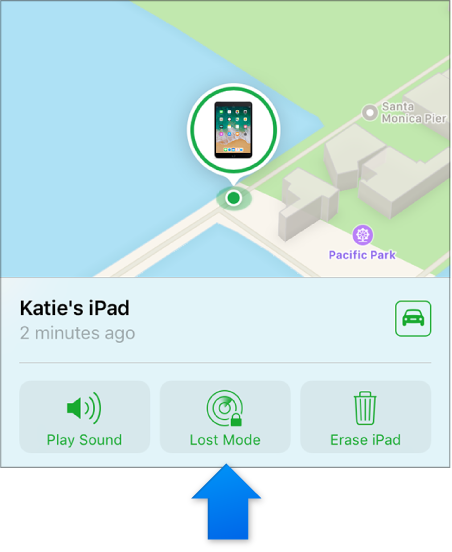
- Follow the onscreen instructions, keeping the following in mind:
- If your iOS device or Apple Watch has a passcode, it’s required to unlock the device. Otherwise, you’re asked to create a passcode now.
- If you’re trying to place a family member’s iOS device in Lost Mode, and the device doesn’t have a passcode set, that person’s Apple ID password must be entered on this device.
- If you’re trying to lock a family member’s Mac, that person’s Apple ID password must be entered on this device.
- If you’re asked to enter a phone number, enter a number where you can be reached. The number appears on the device’s Lock screen.
- If you’re asked to enter a message, you may want to indicate that the device is lost or how to contact you. The message appears on the device’s Lock screen.
- Note: If you forget the passcode, or if you set an EFI firmware password on your Mac before it was lost, then lock it and later find it, you may need to take it to an authorized repair center to unlock it.
- If you’re using a friend’s device, sign out of Find My iPhone when you’re done.
If you’re using a device that supports 3D Touch, you can press the device you’re looking for in the list to peek at its location, then swipe up and tap Lost Mode or Lock. Press a little deeper to see more options.
Track your device in Lost Mode
If you use Lost Mode, when tracking begins, you see your device’s current location, as well as any changes in its location on the map.
Note: You cannot use Lost Mode to track a Mac or iOS 5 device.
- If your device is online
 when you put it in Lost Mode or lock it, it locks and tracking begins (if applicable). If Location Services is turned off on the device, it’s temporarily turned on to track your device’s location. A confirmation email is sent to your Apple ID email address.
- If your device is offline
 , the passcode lock and tracking (if applicable) take effect the next time it’s online.
Turn off Lost Mode or change your contact info
You can turn off Lost Mode by entering the passcode on the device. For Apple Watch or an iOS device, you can also follow the steps below to change the contact information displayed on your lost device or to turn off Lost Mode.
Note: If your credit and debit cards for Apple Pay were suspended because you put your device in Lost Mode, when you turn off Lost Mode and sign back in to iCloud, you can resume using your cards.
- Sign in to Find My iPhone on this device with your Apple ID (the one you use with iCloud).
- In the Devices list, tap the device that’s in Lost Mode.
- Tap Actions, then tap Lost Mode
 .
- Change the contact information, or tap Turn Off Lost Mode.
You can also find instructions for turning on Lost Mode on a device on iCloud.com. Click the Help button
 , then go to Find My iPhone > Use Lost Mode.
- 0
rodert82 ·
Imported from the Apple Support Forums via the Wayback Machine 🔗
thanks I could unlock it. I thank you, you are the best
- 0