Benches / macOS
5
How to add Pinterest button to Mojave Saf…
apple Verified ·
Imported from the Apple Support Forums via the Wayback Machine 🔗
Does anyone know how to add the Pinterest button to Safari on MacBook Pro, version Mojave 10.14.2? The button disappeared when I upgraded.
5 replies
Sign in or join Beachball Help to reply.
0
dominic23 ·
Imported from the Apple Support Forums via the Wayback Machine 🔗
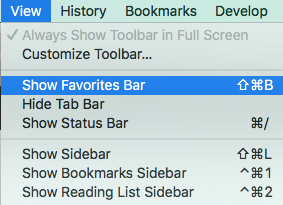
- Click the "View" menu in the Safari menubar. A dropdown will appear.
2. Click "Show Favorites Bar".
0
dominic23 ·
Imported from the Apple Support Forums via the Wayback Machine 🔗
Pinterest button
https://about.pinterest.com/en/browser-button
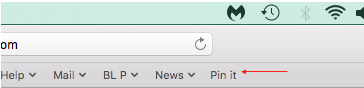
Click the link posted above to open the Pinterest page.
Drag the red “Pin it” button to the Favorites bar.
0
LilianneLB ·
Imported from the Apple Support Forums via the Wayback Machine 🔗
Thanks but I don't see a favorites bar beneath the address bar, only tabs.
0
dominic23 ·
Imported from the Apple Support Forums via the Wayback Machine 🔗
- Click the "View" menu in the Safari menubar. A dropdown will appear.
2. Click "Show Favorites Bar".
0
LilianneLB ·
Imported from the Apple Support Forums via the Wayback Machine 🔗
Thanks so much. I finally have my Pinterest button back which in the Mac Sierra version used to be by the address bar.