Imported from the Apple Support Forums via the Wayback Machine 🔗
Sorry if this has already been addressed....
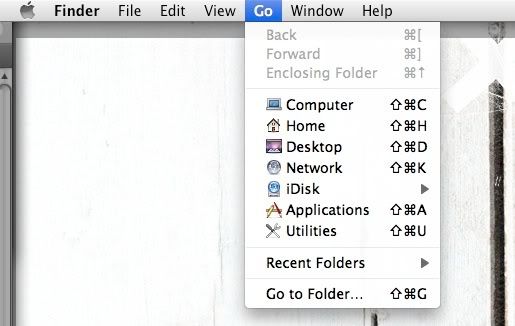
I'm trying to connect to my Vista machine from Powerbook running 10.5.2. In Finder, nothing happens when I do command-K and in the Go drop-down menu, there is no "Connect to Server" option.
Other threads discussed using these to connect but why are they not showing up for me?
Imported from the Apple Support Forums via the Wayback Machine 🔗
In the OS X Finder's menubar, "Go" has always had the "Connect to Server" option. Command+K is the keyboard shortcut equivalent. So you're saying you installed/upgraded to Leopard and "Connect to Server" doesn't even show up as a menu item?
I've never heard of this option magically disappearing from the Finder menu.
Check your network settings and see if you have AT LEAST some type of network configured (e.g. WiFi or Ethernet, etc.).
0
Nathan Macaluso·
Imported from the Apple Support Forums via the Wayback Machine 🔗
That is exactly what happened. I am definitely on the network; other macs show up under network shares, and from my vista box, my mac shows up but I can only see the public folder, with no way of logging in.
Imported from the Apple Support Forums via the Wayback Machine 🔗
Is the option gone for all users, what happens if you define a new user?
0
semiotics101·
Imported from the Apple Support Forums via the Wayback Machine 🔗
Only thing I can think of is Parental Controls? Has an Admin disabled your ability to connect to servers? Is there any other "networking" software installed on your computer/workstation? I do not believe there is any known Leopard bug for this menu item magically disappearing???
0
Nathan Macaluso·
Imported from the Apple Support Forums via the Wayback Machine 🔗
At first, I was logged in as the administrator, the only user I h ad set up. So, I created a standard account, and the Connect to Server does show up there. So, is there something wrong with my admin account? I have no parental controls set up.
0
xnav·
Imported from the Apple Support Forums via the Wayback Machine 🔗
Humm, look for a difference in the /Users/<userID>/Library/Preferences/com.apple.finder.plist
files?
0
semiotics101·
Imported from the Apple Support Forums via the Wayback Machine 🔗
Sounds like now it's a User privilege setting. You will have to go through your list of Users (if you are Admin) and make sure they have access to connect to Networks, File Sharing, etc. Once the User is successfully allowed privilege - the Connect to Server option will show up.
0
Nathan Macaluso·
Imported from the Apple Support Forums via the Wayback Machine 🔗
So, I just created a new admin user, and copied everything over from my old user and now it works. I'm just going to delete the old user stuff.