Imported from the Apple Support Forums via the Wayback Machine 🔗
Hello,
I have four Mac computers, including two MacBook Air.
I back up my main computer (an iMac) into a Seagate external HD using Time Machine.
I can plug the Seagate back-up disk into 3 of the 4 computers (including another MacBook Air) and access all my data, but I cannot have access to the data from the Seagate backup disk with one of the MBAir, It tells me I don’t have the “privilege” or permission to do it.
I have checked the permissions or privileges from the “get info” of Time Machine and nothing looks unusual.
However, I have no problem with another MBAir. Both have the same OS (10.11.6.6 El Capitan).
What to do to get the privilege and access my data on the MBAir that refuses me entry to the Seagate backup disk?
Imported from the Apple Support Forums via the Wayback Machine 🔗
Reset permissions
If the issue started after changing the permissions of items in your home folder, reset permissions:
From the Finder menu bar, choose Go > Home. Your home folder opens.
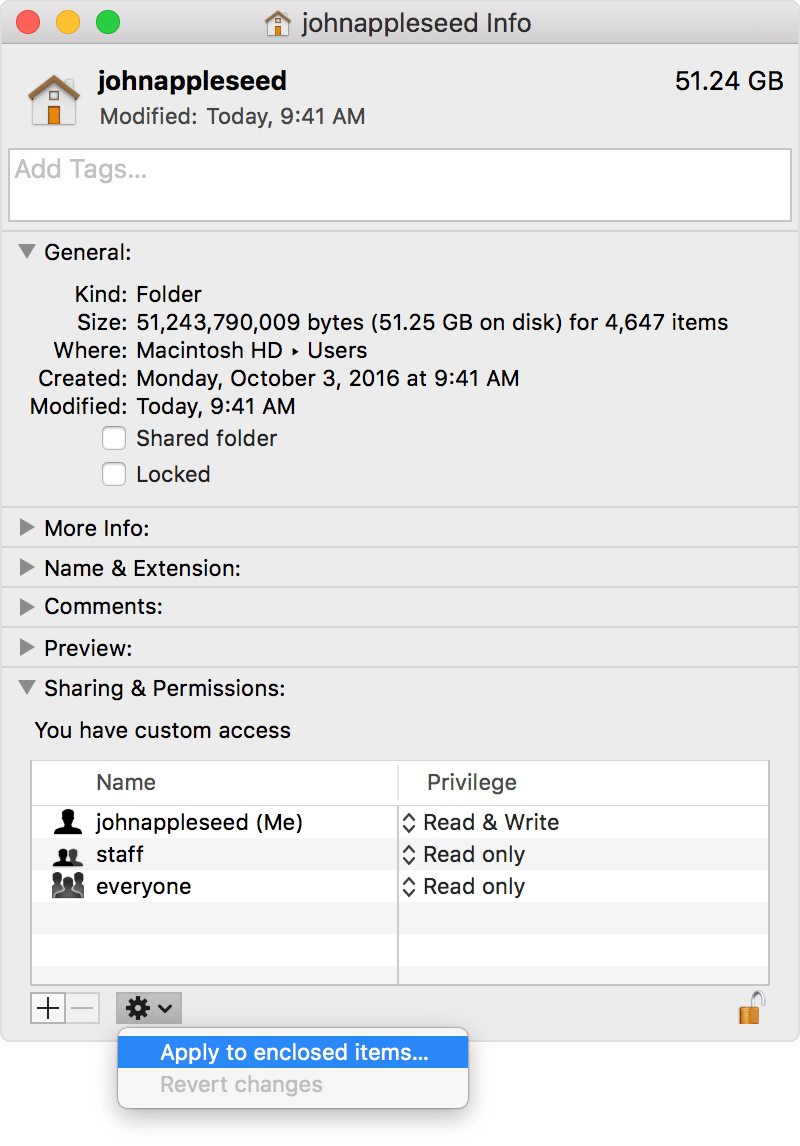
Choose File > Get Info. An Info window for your home folder opens.
If the Sharing & Permissions section at the bottom of the window isn't open, click the triangle in that section to open it.
If the Lock button at the bottom of the window shows a closed lock , click the lock and enter an administrator name and password.
Click the Action menu in the bottom corner of the window, then choose “Apply to enclosed items.” Click OK to confirm the action. A progress bar appears at the top of the window.
When the progress bar completes, open the Terminal app, which is in the Utilities folder of your Applications folder.
Paste or type this command in Terminal, then press Return:
diskutil resetUserPermissions / `id -u`
On U.S. keyboards, the ` character is just above the Tab key. After entering the diskutil command, if Terminal says that permissions reset on user home directory failed (error -69841), enter chflags -R nouchg ~, then enter the diskutil command again.
When the process completes, quit Terminal.
Restart the computer, then test to see if the issue is fixed.
Imported from the Apple Support Forums via the Wayback Machine 🔗
Thank you for taking the time to try and help me. Unfortunately, it did not work. I had never changed permissions to start with and then there is a referral to an OS I don't have (I have el capitan). Finally out of desperation I bought a new Seagate Plus ext. HD, backed up my iMac and then used it in the MacBook AIR and it worked.
I am still left wondering why the older Seagate worked in all other Mac compters (including another AIR with the same OS), and not in mine. But .... Again, thank you for trying.

 in that section to open it.
 , click the lock and enter an administrator name and password.
 in the bottom corner of the window, then choose “Apply to enclosed items.” Click OK to confirm the action. A progress bar appears at the top of the window.