
4 replies
Sign in or join Beachball Help to reply.
- 0
SravanKrA ·
Imported from the Apple Support Forums via the Wayback Machine 🔗
If you can't activate your iPhone
If your iPhone can't be activated or an alert says the activation server is unavailable or the SIM card is unsupported, learn what to do.
Check these things first
- If an error says, "No SIM" or "Invalid SIM," learn what to do.
- If asked to sign in with an Apple ID during activation, learn about Activation Lock.
Still need help? Use the next section.

Follow these steps
- Check the list on the System Status page. If the box by iOS Device Activation isn't green, try to activate your iPhone later.
- If asked to enter your password as you activate your iPhone, enter the password. (A password prompt means that Activation Lock might be enabled in Find My iPhone.)
- Restart your iPhone.
- If you're using a cellular data connection, connect to a reliable Wi-Fi network instead.
If you still can't activate, here's how to activate your iPhone through iTunes instead:
- Make sure that you have the latest version of iTunes.
- Check that your computer has an Internet connection.
- Open iTunes on your computer. With the cable that came with your iPhone, connect your iPhone to your computer.
- Wait while iTunes detects and activates your iPhone:
-
- If iTunes shows, "Set up as New" or "Restore from Backup," it means that iTunes activated your iPhone.
- If an error in iTunes says that the SIM card isn't compatible, contact your carrier.
- 0
king52 ·
Imported from the Apple Support Forums via the Wayback Machine 🔗
the above picture is what I’m deliberately talking about , it has caused me migraines have tried all you stated but it gets stalked here
- 0
king52 ·
Imported from the Apple Support Forums via the Wayback Machine 🔗
Please I’m still looking forward to your response on this subject matter
- 0
SravanKrA ·
Imported from the Apple Support Forums via the Wayback Machine 🔗
If you see No Service or Searching on your iPhone or iPad
If you see No Service or Searching on your iPhone or iPad (Wi-Fi + Cellular), or can't connect to a cellular network or cellular data, follow these steps:
Check your coverage area
Make sure that you're in an area with cellular network coverage. Then follow these steps:
- To turn cellular data on or off, go to Settings, then tap Cellular or Mobile Data. If you're using your iPad, you might see Settings > Cellular Data.
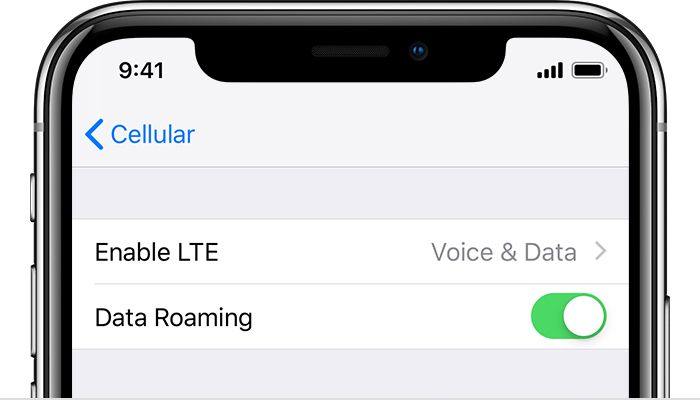
- If you're traveling internationally, make sure that your device is set up for data roaming. Go to Settings > Cellular > Cellular Data Options > Data Roaming.
Restart your iPhone or iPad
Restart your device. If you're not sure how to do this, follow these steps.
Check for a Carrier Settings update
To manually check for and install a carrier settings update:
- Make sure that your device is connected to a Wi-Fi or cellular network.
- Tap Settings > General > About. If an update is available, you'll see an option to update your carrier settings.
- To see the version of carrier settings on your device, tap Settings > General > About and look next to Carrier.
If you insert a new SIM card into your iPhone or iPad, you need to download the carrier settings for your new carrier.
Take out the SIM card
After removing the SIM card, put it back in. You might need to contact your carrier:
- If the SIM card is damaged, or doesn't fit in the SIM tray, ask your carrier for a new SIM card.
- If you transferred your SIM card from another device, ask your carrier if your SIM card works with your iPhone or iPad.
Learn more about removing your SIM card.
Reset your Network Settings.
Go to Settings > General > Reset > Reset Network Settings. This also resets Wi-Fi networks and passwords, cellular settings, and VPN and APN settings that you've used before.
Update your iPhone or iPad
Update your iPhone or iPad to the latest version of iOS.
Contact your carrier
Issues with your carrier or account might affect your service. Contact your carrier to:
- Verify that your account is active and in good standing.
- Make sure there are no outages in your area.
- Check that your device isn't blocked from receiving cellular services and is set up with the right data plan.
Only your wireless carrier can access and manage details about your account. If you need help finding your wireless carrier's service page, use the Apple carrier-support article or an online search engine.
If you see No Service or Searching on your iPhone or iPad - Apple ...