Imported from the Apple Support Forums via the Wayback Machine 🔗
Mirror your iPhone, iPad, or iPod touch
Use Screen Mirroring to see the entire screen of your iOS device on your Apple TV.
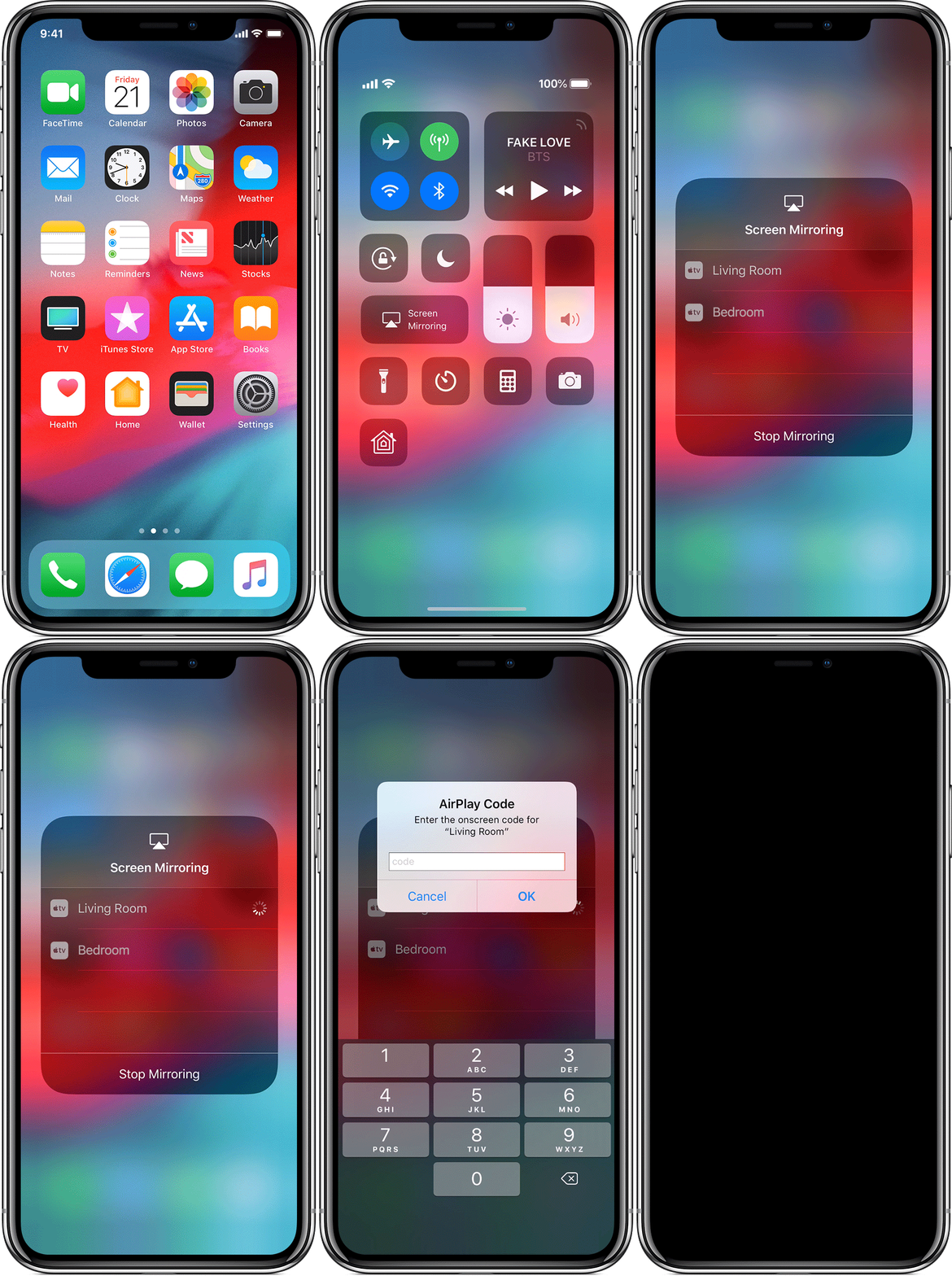
Open Control Center:On iPhone X or later or iPad with iOS 12 or later: Swipe down from the upper-right corner of the screen.
On iPhone 8 or earlier or iOS 11 or earlier: Swipe up from the bottom edge of any screen.
Tap Screen Mirroring.
Select your Apple TV from the list. If you don’t see your Apple TV, make sure that your iOS device is connected to the same Wi-Fi network as your Apple TV. Need help?
If an AirPlay passcode appears on your TV screen, enter the passcode on your iOS device.
Your TV uses your iOS device's screen orientation and aspect ratio. To fill your TV screen with the mirrored iOS device screen, change your TV's aspect ratio or zoom settings.
To stop mirroring your iOS device, open Control Center, tap Screen Mirroring, then tap Stop Mirroring. Or press the Menu button on your Apple TV Remote.

 Screen Mirroring.