Imported from the Apple Support Forums via the Wayback Machine 🔗
Hi, as i said above, delete app& data in setting not work. I’m looking for a general way to deleted app data not just for Facebook. Thanks for your help
0
SravanKrA·
Imported from the Apple Support Forums via the Wayback Machine 🔗
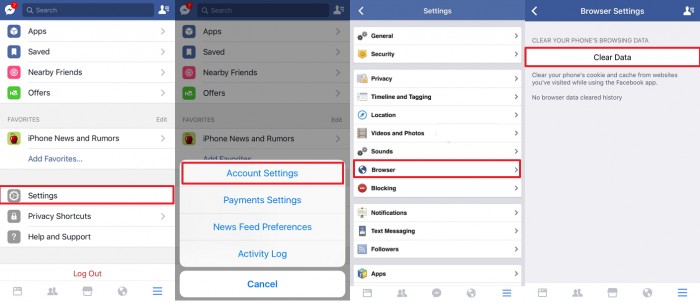
Clear Cache from Facebook App
Step 1: Launch Facebook app
Step 2: Tap on the "More" button at the bottom.
Step 3: Choose "Settings" and then "Account Settings" from the drop-down list.
Step 4: Tap "Browser" to Browser Settings page.
Step 5: Tap "Clear Data". That's it.
Clear Facebook Cache from Settings App
The other manual way to Facebook cache in iOS is to uninstall Facebook app from your iPhone and then install it again.
For doing this, simply follow the steps: Tap on Settings > General > Usage > Manage Storage > Facebook > Delete App.
This will delete the Facebook app from your iPhone along with all the cache data.
Note: It is generally recommended that you should clear Facebook cache on iPhone once in a month, if you use Facebook on a regular basis. If you don’t really use Facebook app on your iPhone very frequently, you can uninstall and then install it again once in every 2-3 months.