Imported from the Apple Support Forums via the Wayback Machine 🔗
We went to an Apple store to upgrade a phone. We had backed up the phone to a computer. Long story short, they would not do an upgrade, and we went to AT&T and bought the phone there. When we got home, I tried to restore the new phone, and got the message "Can't restore because the OS versions are different". This is extremely concerning because all Apple ever says is "Backup your phone". Not "make sure you upgrade to the latest version of iTunes", another error I've gotten trying to restore a backup, or "make sure your phone is upgraded to the latest iOS successfully and is backed up successfully before trading in your phone". First, there should be a way to restore photos, email, texts, possibly app data, and everything except apps without getting a "can't restore" error. Second, because the traded-in phone gets recycled, there is NO WAY to recover from a backup failure. We are just lucky that Apple did not accept our trade-in. Please fix your backups and notify customers of an appropriate backup strategy before accepting a phone for trade-in.
Imported from the Apple Support Forums via the Wayback Machine 🔗
I don't think you fully understood my issue. I'm telling you what I saw, wish I had saved screenshots.
I think I know what happened:
Before backing up your old iPhone, you updated to the recent 12.1.3 release.
The new iPhone likely would not have this latest release (probably had 12.1.2, perhaps older depending on how long it had been on the shelf).
The new iPhone having an older iOS than the version used to create your backup is the problem. You can install a backup from an iOS version that is older, but not newer than the iOS version on the phone you're trying to load it onto.
If that sounds plausible (this has happened to me) then this is the solution:
Set the new iPhone up without your backup -- be SURE to use a different name for the iPhone than your old iPhone. Use a different name to ensure that any new backup made does not overwrite your old backup.
Do not spend too much time setting up the new iPhone once activated -- just get it up and running, don't worry about music, photos, etc.
Update the new iPhone to 12.1.3 -- either over the air or using iTunes. If you use iTunes it will want to create a backup first, this is why you choose a different name for your new iPhone, so that the old backup is not overwritten.
Let the new iPhone update to 12.1.3, then (re-)connect the new iPhone to iTunes and start the Restore process.
When prompted, be sure to choose your OLD iPhone's backup (as indicated by the name and date/time of backup).
iTunes will now install your old iPhone's backup onto your new iPhone.
Sounds a lot more complicated than it really is, but it's pretty easy. In summary, the problem stems from your old iPhone having a newer version of iOS than the new iPhone (that happens because iPhones can sit on the shelves for weeks or months).
0
SravanKrA·
Imported from the Apple Support Forums via the Wayback Machine 🔗
I feel you have to understood the backup process better. Learn before you teach.
f you're restoring an iCloud backup that requires a newer version of iOS, Setup Assistant might prompt you to update your software. If you choose to download and install the update, Setup Assistant will automatically update your software and then restore your backup.
If you're restoring an iTunes backup that requires a newer version of iOS, you might see an error that your iTunes backup can't be restored because the software is too old. Follow these steps to update your device and restore the backup:
Set up, update, and erase your device
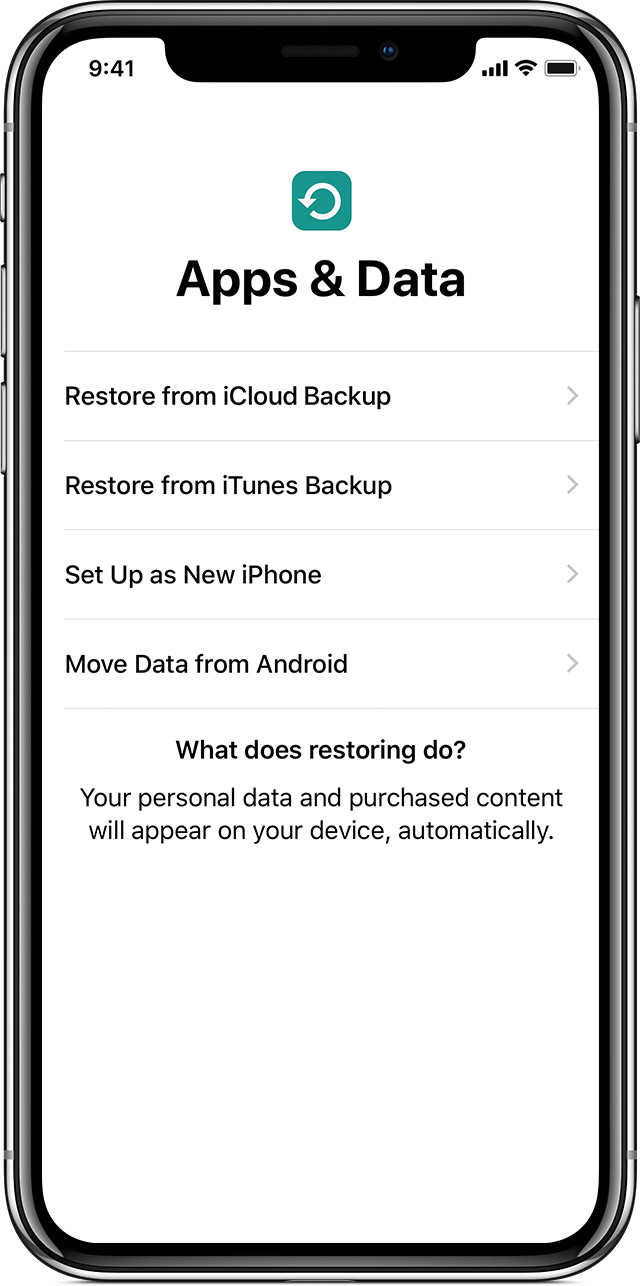
In iTunes, or from the Apps & Data screen on your iPhone, tap Set Up as New instead of Restore from Backup. If you already tapped Restore from Backup, tap Back to return to the Set Up screen.
Follow the remaining steps. For now, you can skip the steps for Apple ID, Touch ID, and passcode.
Let the update finish, and wait for your device to restart.
Erase your iOS device: Tap Settings > General > Reset > Erase All Content and Settings. After your device is erased, it restarts and you'll see the Hello screen in the Setup Assistant.
Now you should be able to set up your device again, and select a backup to restore from.
0
pattydl·
Imported from the Apple Support Forums via the Wayback Machine 🔗
Thank you, rockmyplimsoul for a thorough method.
I wasn't really asking for a solution because I figured out a solution, which pretty much mirrors yours (which I should have included). My steps:
Upgrade to the latest version of iTunes on your laptop
Using iTunes or from the phone, upgrade to the latest iOS on the old phone
Back it up to ITunes, selecting Backup to Computer
Verify that the backup completed by checking backups in the Preferences menu
Upgrade to the latest iOS on the new phone from iTunes
Using iTunes, restore the old phone backup to the new phone
Backup the new phone on iTunes
My original point is that Apple only tells you to "backup your phone" - they do not ask any insightful questions about how you backed up, check the iOS version on the old and new phones, and make sure that you will be able to successfully restore your backup before turning in a phone for trade-in. I'm also asking for a more thoughtful backup strategy, so even if there is app iOS incompatibility, your photos and other compatible files should be able to be restored from ANY backup.
0
razmee209·
Imported from the Apple Support Forums via the Wayback Machine 🔗
There is nothing to fixed, there is no flaw.
I've been using the same data from a back up of my 3GS, to my 4S, to my 5S, to 6S, to my X and now to my XS.
Still have the same text message pictures etc.
Email isn't part of the itunes backup.
0
pattydl·
Imported from the Apple Support Forums via the Wayback Machine 🔗
Thank you for that condescending putdown. Understand before you correct. I was restoring a backup from a COMPUTER, not the ICLOUD. I choose NOT to have my children's accounts in the Cloud. I work for a very large tech company in the DATACENTER GROUP. I have a PhD in CS and 30 years of software development experience in tech.
0
LD150·
Imported from the Apple Support Forums via the Wayback Machine 🔗
Yes it was obvious from your first post that you were merely trying to make a statement of disappointment which is why I suggested sending feedback to Apple and not here.
People who wave PHDs about on here are in danger of being called Elmer. Take care.
0
LD150·
Imported from the Apple Support Forums via the Wayback Machine 🔗
Suggest it to Apple at
apple.com/feedback
we are fellow owners
0
pattydl·
Imported from the Apple Support Forums via the Wayback Machine 🔗
I don't think you fully understood my issue. I'm telling you what I saw, wish I had saved screenshots.