
2 replies
Sign in or join Beachball Help to reply.
- 0
SravanKrA ·
Imported from the Apple Support Forums via the Wayback Machine 🔗
What is wrong with that?
- May be the App developers have chosen to do so.
- May be you have not set Automatic Update ON
On your iPhone, iPad, or iPod touch
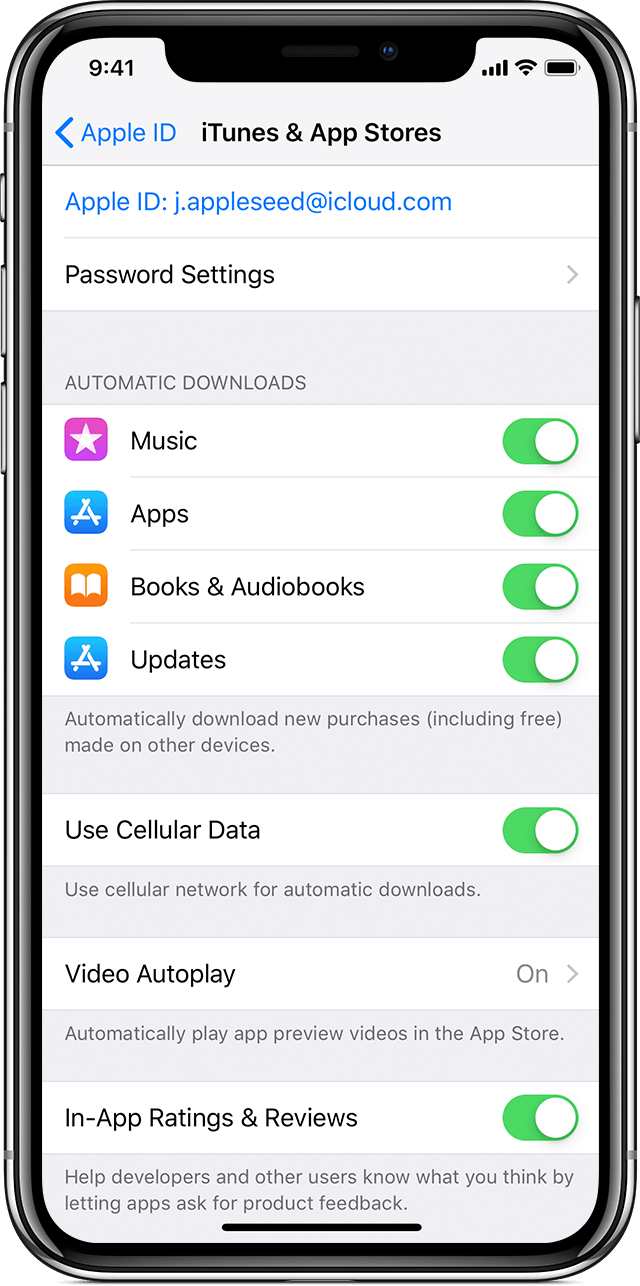
- Tap Settings > [your name] > iTunes & App Store.
- Turn on the content that you want to automatically download.
After you turn on Automatic Downloads for music, apps, or books and audiobooks on all of your devices, all new purchases that you make in the App Store, iTunes Store, or Apple Books on any device download automatically to all of your devices.
Turn on Updates to get Automatic Updates for apps. Any new versions of apps that you currently have on your device will automatically download when they're available.
You can also turn Automatic Downloads on or off over your cellular network on an iPhone or iPad Wi-Fi + Cellular. Go to Settings > [your name] > iTunes & App Store and turn Use Cellular Data on or off. Cellular Data downloads are limited to a file size of 150 MB or smaller.
- 0
kb1951 ·
Imported from the Apple Support Forums via the Wayback Machine 🔗
I would guess that they just happened to all need updates and you have automatic updates turned on.