Imported from the Apple Support Forums via the Wayback Machine 🔗
Every "how to" on removing someone from a group text says tap on info and you get a list of the contacts. Then simply swipe left to get the delete button to delete them. It does not work. There is no Delete button. In the comments there are several people saying it does not work for them.
So my question is...How do you remove someone from a group text on iPhone. I am on an iPhone 6+ using iOS 12.1.4
Imported from the Apple Support Forums via the Wayback Machine 🔗
Remove a person
Tap the group conversation that has the contact you want to remove.
Tap the top of the group conversation.
Tap , then swipe left over the name of the person you want to remove.
Tap Remove, then tap Done.
0
MacSteve75·
Imported from the Apple Support Forums via the Wayback Machine 🔗
I saw that information on other posts as well, but I was hoping that there was a workaround. Seems like that should be something that could happen no matter what device you are using. Disappointing info, but Thanks for your help.
0
Lyssa·
Imported from the Apple Support Forums via the Wayback Machine 🔗
Is the group a mix Android and iOS devices? If so, you can't remove anyone.
~Lyssa
0
MacSteve75·
Imported from the Apple Support Forums via the Wayback Machine 🔗
Thanks for the suggestion, but I need to remove someone, not mute the conversation.

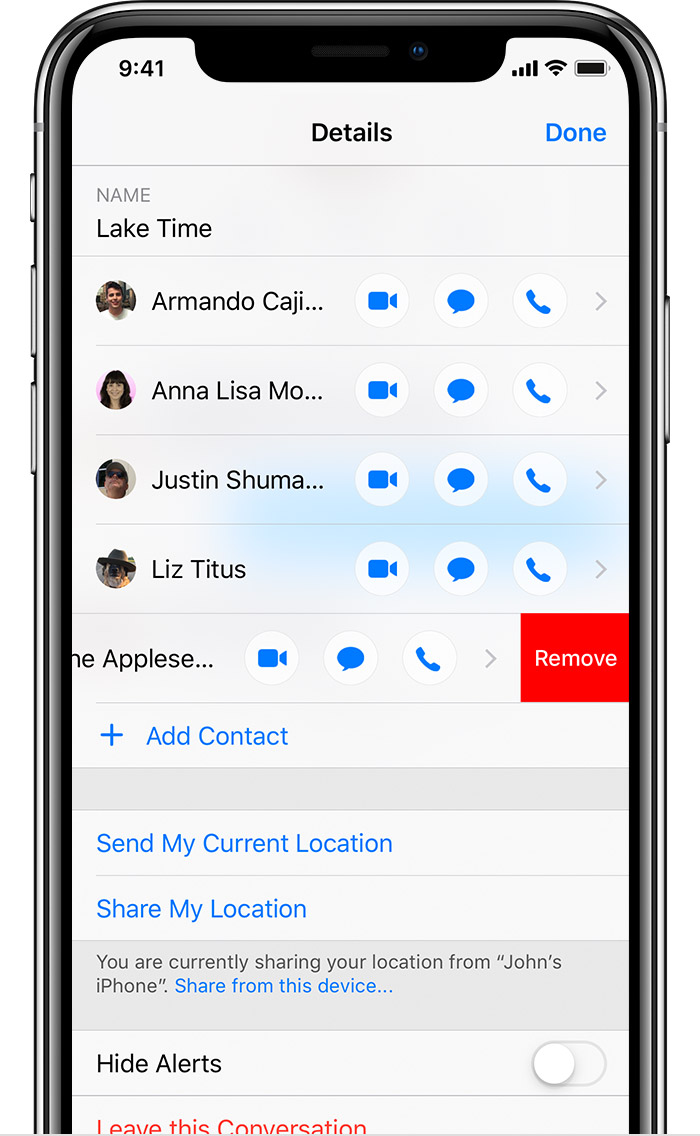
 , then swipe left over the name of the person you want to remove.
