
Photos local copy move
apple Verified ·
Imported from the Apple Support Forums via the Wayback Machine 🔗
I have recently migrated my photos to the cloud with a copy retained on my local pc. i was hoping to relocate the local copy from my macbook air hdd to a external hdd. what is the best way to do this?
3 replies
Sign in or join Beachball Help to reply.
- 0
léonie ·
Imported from the Apple Support Forums via the Wayback Machine 🔗
If all your photos and videos are now in iCloud Photos, you can move the Photos Library to an external drive.
The fastest way would be to create a new, empty library on an external drive. The requirements for an external drive are described here: Move your Photos library to save space on your Mac - Apple Support
Basically, the file system format of the drive should be MacOS Extended(Journaled) or APFS, not case-sensitive. And the drive must not be used by Time Machine and should be directly plugged in, not a network volume.
You can either drag your Photos Library to the external drive and then double click it to open it in Photos or create a new, empty library on the external drive. Starting with a new library will be quicker, but you cannot save your projects this way.
- Quit Photos.
- In the Finder, go to the external drive where you want to store your library.
- In another Finder window, find your library. The default location is Users > [username] > Pictures, and it's named Photos Library.
- Drag your library to its new location on the external drive. If you see an error, select your external drive's icon in the Finder, then choose File > Get Info. If the information under Sharing & Permissions isn't visible, click
 , then make sure the "Ignore ownership on this volume" checkbox is selected. If it's not selected, click
 to unlock it, enter an administrator name and password, then select the checkbox.2
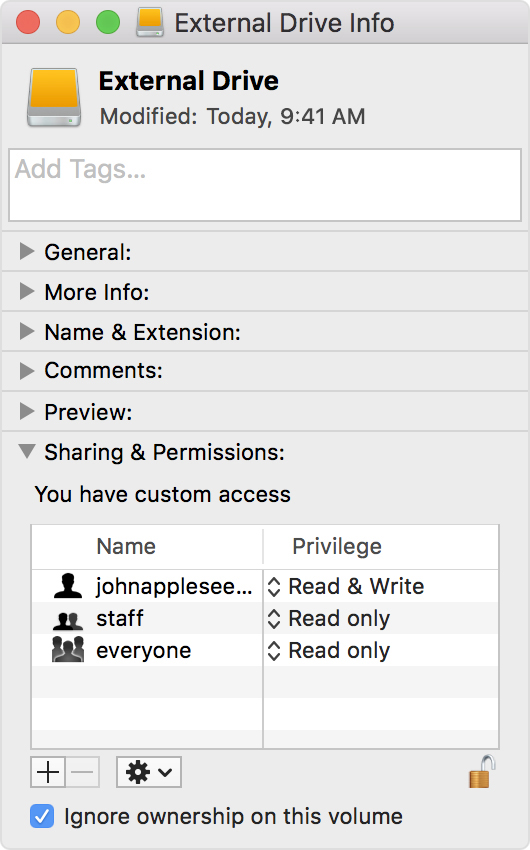
- After the move is finished, double-click Photos Library in its new location to open it.
- If you use iCloud Photo Library, designate this library as the System Photo Library.
To start with an empty Library: Create additional photo libraries in Photos on Mac - Apple Support
- , If the Photos app
 on your Mac is open, choose Photos > Quit Photos.
- Hold down the Option key and double-click the Photos icon in the Applications folder (or click the Photos icon in the Dock) to open Photos.
- In the Choose Library dialog, click Create New.
- Type a library name and choose a location to store the library.
- Click OK.
- 0
Rusty Bunn ·
Imported from the Apple Support Forums via the Wayback Machine 🔗
thank you leonie. Finally found time to try your suggestion of creating a new photo.library and so far so good.
KInd regards
- 0
léonie ·
Imported from the Apple Support Forums via the Wayback Machine 🔗
That is great. You're welcome 😊