
find one lost airpod
apple Verified ·
Imported from the Apple Support Forums via the Wayback Machine 🔗
I went to bed listening to my Airpods last night. When I woke up - I could only find one. I opened up Find my iPhone and when I click Play Sound, only my right airpod will ring. No matter what I do, I cannot get the right airpod to ring. The find my iPhone app won't let me mute only one, the right one i have; those options are grayed out.
The map is also no use because I know for a fact that both Airpods are in my room. Why is it that only one of them will ring? What can I do?
3 replies
Sign in or join Beachball Help to reply.
- 0
Cåts ·
Imported from the Apple Support Forums via the Wayback Machine 🔗
Refresh the map.
Next to each device, you see a colored dot that tells you the device’s status.

A blue dot shows the device that you’re using to look for your missing AirPods.

A green dot lets you know that your AirPods are online. That means you can play a sound or get directions to find them.

A gray dot means your AirPods are off, out of battery, in their case, or out of range. You might see the last known location.
If your AirPods are separated from each other, you see only one location at a time on the map. Find the AirPod that you see on the map and put it in its case. Then refresh the map and find the other one.

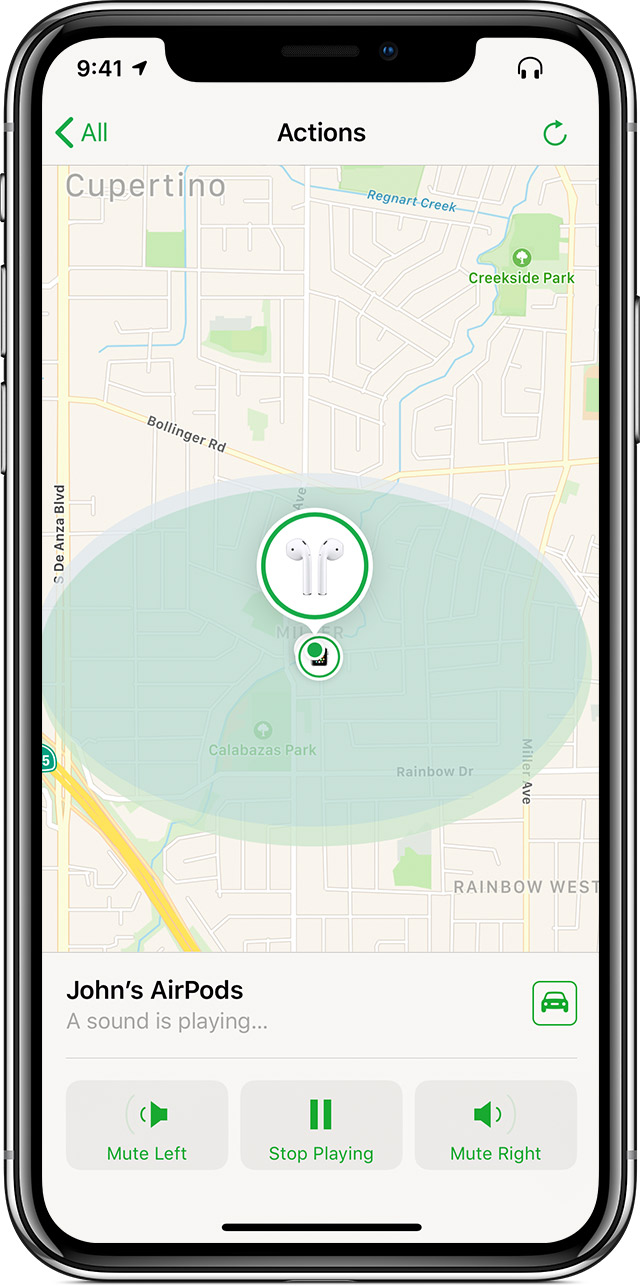
Play a sound
If your AirPods are near any of your Apple devices and connected to Bluetooth, you can play a sound to help you find them from iCloud.com or the Find My iPhone app. Your AirPods play a sound that gets gradually louder for two minutes, or until you tell them to stop.
- Go to Actions > Play Sound.
- If your AirPods are separated, choose Mute Left or Mute Right to find one at a time.
- When you find your AirPods, tap or click Stop Playing.
Make sure that you remove the AirPods from your ears before you play a sound.
If your AirPods are offline
If you didn't turn on Find My iPhone before your AirPods went missing, you can't use it to locate your device. If you see a gray dot next to your AirPods on the map, you can't play a sound to find them but you can still get directions to the location where they were last connected. If your AirPods do come back online, you'll get a notification on the iPhone, iPad, or iPod touch you use them with.
Find My iPhone is the only way that you can track or locate a lost or missing device. There is no other Apple service that can find, track, or otherwise flag your device for you.
- 0
mdhurst ·
Imported from the Apple Support Forums via the Wayback Machine 🔗
I would guess the reason the other one is not showing up is because it is now out of charge, once they run out of charge they will not show up on find my iPhone
- 0
Cåts ·
Imported from the Apple Support Forums via the Wayback Machine 🔗
Refresh the map.
Next to each device, you see a colored dot that tells you the device’s status.
A blue dot shows the device that you’re using to look for your missing AirPods.
A green dot lets you know that your AirPods are online. That means you can play a sound or get directions to find them.
A gray dot means your AirPods are off, out of battery, in their case, or out of range. You might see the last known location.
If your AirPods are separated from each other, you see only one location at a time on the map. Find the AirPod that you see on the map and put it in its case. Then refresh the map and find the other one.
Play a sound
If your AirPods are near any of your Apple devices and connected to Bluetooth, you can play a sound to help you find them from iCloud.com or the Find My iPhone app. Your AirPods play a sound that gets gradually louder for two minutes, or until you tell them to stop.
- Go to Actions > Play Sound.
- If your AirPods are separated, choose Mute Left or Mute Right to find one at a time.
- When you find your AirPods, tap or click Stop Playing.
Make sure that you remove the AirPods from your ears before you play a sound.
If your AirPods are offline
If you didn't turn on Find My iPhone before your AirPods went missing, you can't use it to locate your device. If you see a gray dot next to your AirPods on the map, you can't play a sound to find them but you can still get directions to the location where they were last connected. If your AirPods do come back online, you'll get a notification on the iPhone, iPad, or iPod touch you use them with.
Find My iPhone is the only way that you can track or locate a lost or missing device. There is no other Apple service that can find, track, or otherwise flag your device for you.